ASUS Zenbook DUO (2026) at CES 2026: The Dual‑Screen Laptop Finally Grows Up
Quick context: Dual-screen laptops have existed for years, but most felt like prototypes with compromises. At CES 2026, ASUS’ Zenbook DUO (2026) UX8407 is a more serious attempt: tighter design, bigger battery, updated Intel silicon, and the kind of hinge/keyboard refinements that matter after months of real-world use.
What’s actually new in the Zenbook DUO (2026)
ASUS isn’t trying to reinvent the category this year. Instead, it’s doing something arguably more important: removing the friction that kept dual-screen laptops from feeling seamless. The upgrades fall into five buckets:
- A much more seamless “two screens” experience thanks to a redesigned hinge that dramatically shrinks the gap between the displays.
- A big battery jump to 99Wh, which is notable for a 14-inch-class machine—especially one driving two OLED panels.
- New Intel Core Ultra Series 3 options (up to Core Ultra X9 388H), paired with Intel Arc graphics and an NPU (up to 50 TOPS listed by ASUS).
- Refined keyboard docking and improved reliability with a redesigned magnetic docking/pogo-pin approach (ASUS calls this MagLatch).
- Upgrades that improve day-to-day “laptop-ness”: port selection, audio, cooling, and travel readiness.

Design and build: Ceraluminum + a hinge that fixes the #1 annoyance
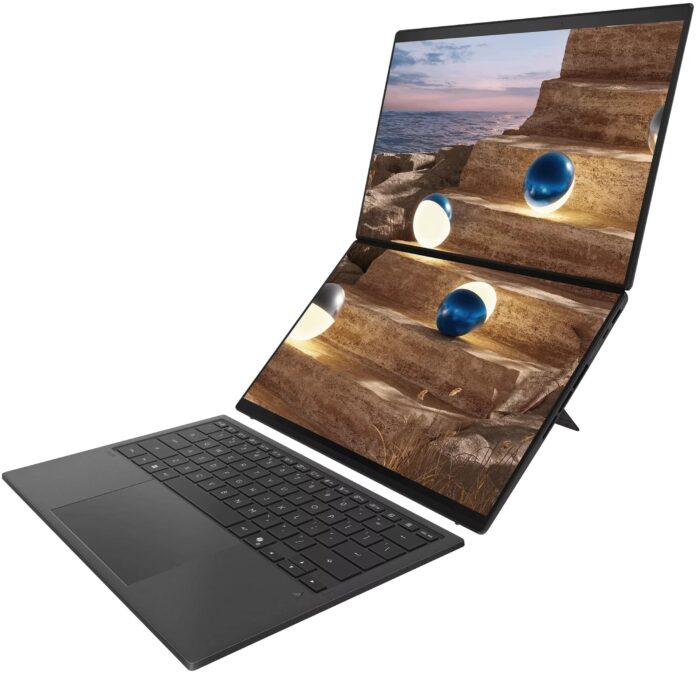
ASUS uses its Ceraluminum finish across the lid/bottom/kickstand, aiming for better durability and scratch resistance. The more important physical change is the new “hideaway” hinge design: the Zenbook DUO can open flat, and—crucially—the two screens sit much closer together, making the workspace feel less like two separate panels and more like one continuous canvas.
In hands-on coverage, the screen gap is described as reduced by roughly 70%, down to around 8.28 mm. That matters more than it sounds: the smaller the separation, the more natural it feels to drag windows, reference content, and treat the setup like a flexible “stacked monitor” workstation.
ASUS also says the chassis footprint is about 5% smaller than the previous generation, while weight stays roughly similar. In plain terms: you’re getting a more compact DUO without paying a portability penalty.
Displays: dual 14-inch 3K OLED, 144Hz, HDR brightness, and anti-reflection
The DUO’s identity is the screens—so it’s good that ASUS isn’t phoning it in here. The Zenbook DUO (2026) uses:
- Two 14-inch OLED touch displays in a 16:10 aspect ratio
- 3K resolution (2880 x 1800) on each panel
- Up to 144Hz refresh rate, with variable refresh rate listed (48–144Hz)
- Up to 1,000 nits peak HDR brightness (ASUS states Dolby Vision certification)
- An anti-reflection coating intended to reduce glare in brighter environments
- Stylus support (ASUS Pen 3.0 is referenced in hands-on reporting; availability in-box may vary by region)
Why these details matter: the dual-screen concept only works if both screens are “primary monitor quality.” If one panel is dimmer, slower, or less color-accurate, you subconsciously avoid it—turning the whole concept into wasted complexity. On paper, ASUS is pushing the DUO toward parity: two screens you can confidently use for main tasks, not just toolbars.
Keyboard, docking, and modes: laptop when you want it, workstation when you need it
The DUO lives or dies by how quickly you can switch between “normal laptop” and “dual-screen workstation.” The 2026 model keeps the detachable keyboard concept but focuses on making it less fussy:
- Bluetooth keyboard folio that can dock between the displays for travel
- Magnetic docking / redesigned pogo pins for easier attachment and alignment
- Integrated kickstand for stable use in stacked/vertical configurations
In practice, there are a few core workflows this enables:
- Clamshell mode: You want a standard laptop feel—keyboard attached, top screen as your main display.
- Stacked screens mode: Keyboard detached; both screens visible like a mini dual-monitor tower—excellent for writing + research, code + docs, or editing + timeline.
- Tablet-like / pen workflows: With touch + stylus support, you can treat either screen as a canvas for annotation, sketching, or marking up documents.
ASUS also highlights ScreenXpert improvements, including behavior that triggers sharing/annotation tools when the lid opens beyond a wide angle (ASUS mentions beyond 175°). This is the kind of software layer dual-screen devices need: not just “two monitors,” but smart windowing and collaboration shortcuts.
Performance: Intel Core Ultra Series 3 + higher sustained power
According to ASUS, the Zenbook DUO (2026) can be configured with Intel Core Ultra 7 355H, Core Ultra 9 386H, or Core Ultra X9 388H. ASUS also calls out a higher power target (up to 45W), which is meaningful because dual-screen devices tend to be thermally constrained.
What to expect, realistically:
- Better sustained performance for multitasking and creative workloads, thanks to higher TDP headroom and updated cooling.
- Improved integrated graphics via Intel Arc iGPU compared to older generations—useful for light creation work, casual gaming, and accelerated media tasks.
- More “AI PC” features through the NPU (ASUS lists up to 50 TOPS for the NPU and also references higher platform AI performance figures).
This is not a gaming laptop in disguise, and it won’t replace a workstation with a high-end discrete GPU. But for the DUO’s target buyer—professionals who need screen real estate and strong mobility—the combination of modern Intel silicon and higher sustained power should make the second screen feel like a productivity multiplier, not a performance tax.
Battery: 99Wh is a headline for a reason
A 99Wh battery is near the maximum you typically see for air travel-friendly laptops, and it’s a big jump from the prior 75Wh class mentioned in hands-on comparisons. The key nuance: this laptop is powering two OLED displays. So while 99Wh is excellent, buyers should still set expectations based on how they actually use the DUO.
Practical battery guidance:
- One-screen “laptop mode” will always be the most efficient.
- Two-screen brightness + high refresh will consume noticeably more power—especially if both panels are bright and you’re running heavy apps.
- VRR and power profiles can help: if your workflow doesn’t need 144Hz all the time, lowering refresh / using balanced modes will extend runtime.
ASUS includes a 100W adapter and USB-C charging support. For frequent travelers, the practical win is that a dual-screen machine is no longer automatically “the laptop that dies early.”
Ports, camera, audio: surprisingly “complete” for a niche form factor
Dual-screen laptops sometimes sacrifice I/O, but the Zenbook DUO (2026) keeps a strong selection:
- 2x Thunderbolt 4 (USB‑C)
- 1x USB‑A (USB 3.2 Gen 2)
- HDMI 2.1 (FRL listed by ASUS)
- 3.5mm audio jack
- Wi‑Fi 7 + Bluetooth 5.4
On media and calls: ASUS lists an FHD IR camera with Windows Hello and an “ASUS AI Camera” feature set. Audio is also a selling point—ASUS calls out a six-speaker setup with front-firing tweeters integrated into the hinge mechanism and Dolby Atmos support, designed to make the DUO feel like more than just a productivity tool.
Core specs at a glance (official highlights)
- Model: ASUS Zenbook DUO (2026) UX8407
- Displays: Dual 14″ 3K (2880 x 1800) OLED touch, up to 144Hz, HDR peak brightness up to 1,000 nits (per ASUS)
- CPU options: Intel Core Ultra 7 355H / Ultra 9 386H / Ultra X9 388H (per ASUS)
- RAM: up to 32GB LPDDR5x (9600 MT/s listed by ASUS)
- Storage: up to 2TB PCIe Gen4 SSD
- Battery: 99Wh
- Weight: ~1.35 kg without keyboard / ~1.65 kg with keyboard (ASUS figures)
Who should buy the Zenbook DUO (2026) — and who shouldn’t
Great fit if you are:
- A writer / researcher / analyst who constantly jumps between sources and drafts
- A developer who wants code + docs visible without carrying a second monitor
- A creator on the go who benefits from tool palettes / timelines on a second screen
- A multitasker traveler who misses a multi-monitor setup
Think twice if you are:
- A gamer who expects discrete-GPU performance
- Someone who hates “mode switching” (even improved, it’s still more complex than a normal laptop)
- Very price-sensitive (dual OLED panels + niche engineering usually equals premium pricing)
What to watch before buying (pricing, availability, real-world tests)
The CES 2026 story is strong, but a few buying questions remain practical:
- Pricing by region (hands-on reports note pricing wasn’t finalized at announcement time in some coverage).
- Keyboard experience over long sessions (detachable designs can feel different from fixed decks).
- Thermals and fan noise at 45W sustained performance—especially in compact chassis.
- Battery life with two screens active (99Wh helps a lot, but OLED + brightness + refresh still matter).
If you’re interested, the safest play is to wait for full reviews that include sustained performance, noise, and battery testing in both one-screen and two-screen workflows.